


I like how easy it is to use. The only thing I wish it had instructions on how to understand the data it creates. I had to go and talk to our Pro at our golf shop.
Loading the 3D view…
By placing an order, you are agreeing to our privacy policy and terms of service.
- 16 Metrics: Ball + club data per shot from 3 high-speed cameras (face stickers for club data)
- 10" Touchscreen Simulator: On-device Home Tee Hero, training mode, and impact video review. No PC required
- 43,000+ Native Courses: Home Tee Hero plays on the R50 with a Garmin Golf membership
- HDMI + Wi-Fi + USB-C: Project to a TV or screen, or connect a Windows PC for GSPro / E6 Connect / Awesome Golf
- 4-Hour Battery: Rechargeable lithium-ion; can run while plugged in for full sessions
- Compact-Bay Friendly: 2025 ball offset alignment lets it sit beside the ball in 10-ft rooms
 Complete Package
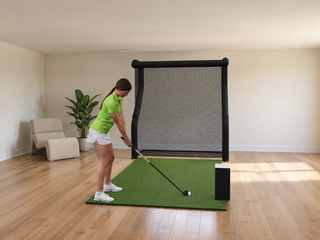
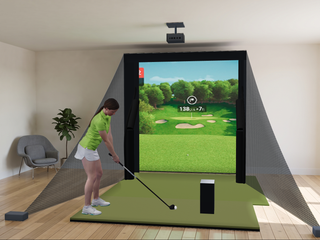
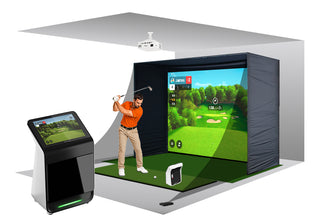
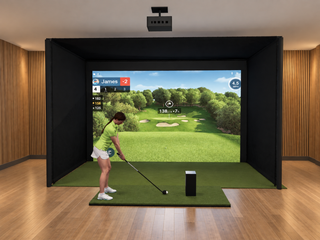
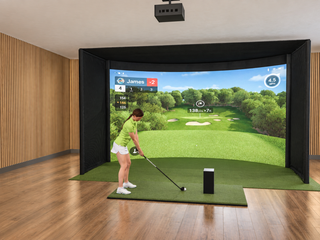
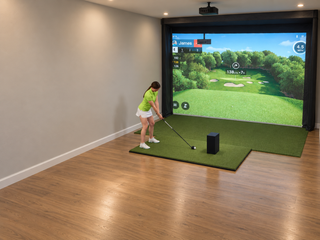
Garmin Approach R50 DIY Enclosure Golf SimulatorLaunch monitor + enclosure + screen + mat + projector
From $8,766.89 →
Complete Package
Garmin Approach R50 DIY Enclosure Golf SimulatorLaunch monitor + enclosure + screen + mat + projector
From $8,766.89 →
Premium 3-Camera Launch Monitor + Built-In Simulator
Garmin Approach R50 Launch Monitor & Golf Simulator
The Garmin Approach R50 is a premium 3-camera photometric launch monitor with a built-in 10" color touchscreen -- a complete all-in-one practice and simulator unit, no phone or PC required. At $4,999.99, it measures 16 of 25 key ball and club metrics, captures impact video, and plays 43,000+ virtual courses through Home Tee Hero straight off the touchscreen.
The 2025 update brings a new 4:3 screen fit, ball offset alignment for compact hitting areas, smoother multiplayer with custom turn order and handedness, and improved short-game tracking on chips and pitches. Plug a projector or TV into the HDMI output for full-bay play, or hit the road with the included carrying case and the internal rechargeable battery.
In Stock Ships free within the contiguous 48 states. Usually ships the next business day when in stock.

See It In Action
Garmin Approach R50 Overview
A walkthrough of the R50's 3-camera tracking, 10" touchscreen interface, and Home Tee Hero simulator experience.
16 Metrics Measured
10" Touchscreen
43,000+ Virtual Courses
3 High-Speed Cameras
Our Review
Garmin Approach R50 Review: Our Take
Buy the Garmin Approach R50 if you want a 3-camera launch monitor that runs its own simulator on a built-in touchscreen, with no phone or PC, for $4,999.99.
It fits home sim builders who want one box that plays 43,000+ courses and feeds a projector over HDMI, practice-driven improvers who want measured ball and club numbers without spending $7,000+ on a Foresight or a wired Uneekor, and Garmin watch or Garmin Golf app owners.
Pros
- Three high-speed cameras measure 16 ball and club metrics and capture impact video.
- Built-in 10" color touchscreen runs Home Tee Hero's 43,000+ courses on the unit, with no phone or PC required.
- HDMI output mirrors play to a projector or TV for full-bay play.
- Internal rechargeable battery (up to 4 hours) and an included carrying case for range sessions.
- The 2025 update adds a 4:3 screen fit, ball offset alignment for compact bays and improved short-game tracking.
Cons
- Club data needs the included face stickers (250 in the box), replaced when worn.
- Home Tee Hero course play needs a separate Garmin Golf membership.
- Shot delay of 0 to 1 second per swing.
- IPX3 water rating (light splash resistance).
Key numbers: 3 cameras, 16 metrics, 10" 800 x 1280 touchscreen, 43,000+ courses, up to 4 hours of battery, approx. 9 lb, HDMI out, $4,999.99.
Key Features
What Sets the Garmin R50 Apart
Triple High-Speed Cameras
Three photometric cameras capture ball and club at impact with 0 to 1 second shot delay -- the same direct-measurement approach used in premium launch monitors, tuned for an all-in-one portable form factor.
10" Built-In Touchscreen
A 10" color LCD touchscreen (800 x 1280) runs Home Tee Hero, Driving Range, Training Mode, and shot video review on the device. No phone or laptop required to start hitting.
All-In-One Form Factor
16.5" x 10.6" x 7.5" and roughly 9 lb. Drops into the included carrying case for travel, sets up on a mat in seconds, and runs on its internal rechargeable battery or AC power.
2025 Compact-Space Alignment
The 2025 update introduces ball offset alignment so the R50 reads clean shots in tighter hitting areas, plus a 4:3 screen fit, multiplayer handedness support, and improved short-game tracking.
HDMI Out to Big Screen
Built-in HDMI output mirrors the R50 screen to your projector or TV. Pair it with a hitting net or impact screen for full-size simulator play without an extra computer.
GSPro & E6 Connect Ready
Beyond native Home Tee Hero, the R50 talks to GSPro, TruGolf E6 Connect, and Awesome Golf over Wi-Fi -- run the same launch monitor through the simulator software you already use (each sold separately).
Who It's For
Is the Garmin R50 Right for You?
Premium Home Sim Builder
You want one box that runs the simulator on its own screen and also feeds a projector. The R50 measures real ball and club data, plays 43,000+ courses out of the box, and skips the dedicated sim PC for most setups.
Practice-Driven Improver
You want measured launch numbers -- ball speed, spin rate, club path, face angle -- without spending 7,000+ on a Foresight or a wired Uneekor. Training Mode dispersion charts and club averages live on the touchscreen.
Family & Multiplayer Player
The 2025 firmware adds custom turn order, handedness support, and smoother multiplayer for foursomes. Built-in screen + HDMI out makes party play easy without setting up phones for every guest.
Garmin Ecosystem Owner
You already use a Garmin Approach watch, the Garmin Golf app, or Garmin Connect. The R50 writes shots and rounds into the same account so range sessions, on-course rounds, and sim play live together.
Data Points
What the Garmin R50 Tracks on Every Shot
Ball metrics measured directly by the triple-camera system on every swing. Club metrics measured when the included club face stickers are applied (250 stickers in the box).
Ball Speed Velocity off the clubface (mph)
Launch Angle Vertical launch angle (degrees)
Launch Direction Horizontal launch angle (degrees)
Spin Rate Backspin (RPM)
Spin Axis Tilt of spin (curve direction)
Carry Distance Distance before the ball lands (yards)
Total Distance Carry plus rollout (yards)
Apex Height Peak height of the ball flight (yards)
Distance Offline Lateral distance from target line (yards)
Club Head Speed Head speed at impact (mph; club sticker)
Smash Factor Ball speed divided by club speed
Club Path In-to-out or out-to-in (degrees; club sticker)
Face to Target Face angle relative to target (degrees; club sticker)
Face to Path Face angle relative to path (degrees; club sticker)
Club Face Angle Open, closed, or square at impact (club sticker)
Angle of Attack Up or down at impact (degrees; club sticker)
Club data requires the included face stickers (250 in the box; one per clubhead, putter excluded). Replace worn stickers to keep club reads consistent.
10" Built-In Touchscreen Simulator
Run Home Tee Hero, Driving Range, Training Mode, and impact video review directly on the R50's 10" color touchscreen. Plug in the HDMI for projector play, or take it to the range on its rechargeable battery.
How It Compares
Garmin R50 vs Bushnell Launch Pro, SkyTrak ST MAX, and Foresight GC3
All four are camera-based launch monitors aimed at home sim builders. The R50 is the only one with a built-in 10" touchscreen and HDMI output -- a true all-in-one box.
| Feature | Garmin R50 ($4,999.99) | Bushnell Launch Pro CB ($2,999) | SkyTrak ST MAX ($1,695) | Foresight GC3 ($6,999) |
|---|---|---|---|---|
| Technology | Photometric, 3 high-speed cameras | Photometric, 3 high-speed cameras | Photometric, 1 high-speed camera + club radar | Photometric, 3 high-speed cameras |
| Placement | Beside ball (ball offset alignment for compact bays) | Beside ball | Beside ball (~1 ft from golfer) | Beside ball (24" in front of golfer) |
| Built-In Display | Yes -- 10" color touchscreen + HDMI out | Yes -- on-device touchscreen | No -- phone or tablet required | No -- iOS / PC required |
| Metrics Measured | 16 of 25 (ball + club) | 12 of 25 (ball + club) | 17 of 25 (ball + club) | 11 of 25 (ball + club) |
| Stickers Required | Club stickers for club data (250 included) | No ball markings; club markers included for club data | No | No ball markings; club markers included for club data |
| Shot Delay | 0 to 1 second | 0 to 1 second | 2 to 4 seconds | 0 to 1 second |
| Min Room Size | 10' D | 10' D | 10' W x 10' D | 12' W x 9' H x 12' D |
| Native Simulator | Home Tee Hero on-device (43,000+ courses) | Foresight app + Foresight Premier (PC); courses via Course Pass | SkyTrak app on phone or tablet | Foresight Premier (PC) via Foresight+ |
| Third-Party Software | GSPro, TruGolf E6 Connect, Awesome Golf | GSPro (Gold subscription) | SKYTRAK app (Core Foresight or Core TrackMan course plans) | GSPro, TruGolf E6 Connect, TGC 2019, FSX Play |
| Subscription Cost | Garmin Golf $99.99/yr (Home Tee Hero) -- core practice modes free | Silver $199/yr or Gold $599/yr; GSPro $250/yr needs Gold | Essential $99.99/yr, Core $299.99/yr (FS) or $349.99/yr (TM), Elite $599.99/yr | 30-day Foresight+ Gold trial included, then Silver $199/yr or Gold $599/yr plus a Course Pass for course play |
| Battery Life | Up to 4 hours (rechargeable Li-ion) | Approx. 8 hours (rechargeable) | AC required (no internal battery) | Up to 8 hours (rechargeable) |
| Best For | All-in-one portable sim with built-in screen + HDMI; no phone or PC needed | Tour-grade portable 3-camera under $3,000 with built-in screen | Flagship SkyTrak with measured spin and the broadest sim software list | Prosumer triscopic, full ball + club data |
Technical Details
Garmin R50 Specifications
Technology Photometric, 3 high-speed cameras
Placement Beside ball; ball offset alignment for compact bays
Dimensions 16.5" W x 10.6" H x 7.5" D
Weight Approx. 9 lb (4.1 kg)
Display 10" color LCD touchscreen, 800 x 1280 px
Battery Rechargeable lithium-ion; up to 4 hours
Power AC adapter included; can run while charging
Connectivity Wi-Fi, Bluetooth, USB-C, HDMI output
Water Rating IPX3 (light splash resistance)
Shot Delay 0 to 1 second per swing
Metrics Measured 16 ball + club metrics (club requires face stickers)
Sensors Triple high-speed cameras + built-in barometer
Compatible Software Home Tee Hero (native), GSPro, E6 Connect, Awesome Golf
In the Box R50 unit, carrying case, AC adapter, 250 club stickers, documentation

Room Requirements
Garmin R50 Indoor Setup Requirements
The R50 sits beside the ball with the cameras pointing toward the impact zone. A minimum of 10 feet of room depth from the hitting position to the net or impact screen is recommended, and the 2025 ball offset alignment helps the unit read clean shots in tighter spaces.
Room Depth 10 ft minimum (ball to net / screen)
Unit Position Beside the ball, roughly 1 to 2 ft from your stance
Ceiling Height 8.5 to 9 ft typical for full swings
Mounting Floor / mat placement; no tripod or ceiling mount
Lighting Standard indoor lighting; avoid direct glare on the camera window
Big-Screen Output HDMI to projector or TV for full-bay play
Building a complete sim bay around the R50? Our hitting mat, projector, and enclosure collections cover the rest of the build.

Software & Subscriptions
Garmin R50 Software Options
The R50 runs Home Tee Hero, Training Mode, and Driving Range natively on its touchscreen. Add Garmin Golf membership for course play, or hand off to GSPro / E6 Connect for full course graphics.
Garmin R50 On-Device — Free
Built into the launch monitor
- Driving Range mode with full shot data
- Training Mode (dispersion, averages)
- Impact video review on the touchscreen
- Garmin Golf app sync for round history
Garmin Golf Membership
$99.99 / year (or $9.99 / month); 30-day trial
- Home Tee Hero: 43,000+ virtual courses
- Multiplayer up to 4 golfers, custom turn order
- Weekly tournaments + leaderboards
- Cloud video storage and premium analytics
GSPro & TruGolf E6 Connect
Sold separately by each publisher
- GSPro: photoreal courses + community library
- E6 Connect: course play and skills challenges
- R50 connects over Wi-Fi from a Windows PC
- Run the same R50 launch data through either app
Awesome Golf
Third-party simulator software
- Family and party mini-games
- Closest-to-the-pin and skills challenges
- Windows PC required for full features
- Sold separately by Awesome Golf
Setup Guide
Getting Started with Your Garmin R50
A quick first-session walkthrough so you are hitting shots and saving data on day one.
Power Up
Plug in the included AC adapter, or fully charge the internal battery. Power on the R50 and tap through the on-screen first-run setup.
Connect Wi-Fi & Account
Join your home Wi-Fi network and sign into your Garmin account from the touchscreen. The R50 pulls firmware updates and writes round data back to Garmin Connect.
Position the Unit
Set the R50 on the mat beside the ball with the cameras pointing toward the impact zone. Use the on-screen alignment guide -- enable ball offset alignment if your bay is tight on width.
Apply Club Stickers
Place one of the included face stickers on the top-center of each clubhead (putter excluded). Keep them clean and replace when worn for consistent club data.
Pick a Mode
Tap into Driving Range, Training Mode, or Home Tee Hero on the touchscreen. Plug in HDMI to mirror to your projector or TV for full-bay play.
Hit and Review
Take a shot. The R50 captures launch data and impact video, displays them on the screen, and writes the session to your Garmin Golf history automatically.
3 Cameras. 10" Touchscreen. 43,000+ Onboard Courses.
In stock. Ships free within the contiguous 48 states. Financing available through Affirm.
Add to Cart | $4,999.99
Related Reading
Learn More About the Garmin R50 and Premium Launch Monitors
Reviews, comparisons, and setup guides to help you get the most out of the R50.
R50 Review
Garmin Approach R50 Review (2026)
Our full hands-on review of the Garmin Approach R50 -- data accuracy, the built-in touchscreen and apps, and who it is right for.
Garmin Comparison
Garmin R10 vs R50: Which Should You Buy?
How the all-in-one R50 compares to the portable Garmin R10 on data, features, and value -- so you pick the right Garmin.
Premium LM Showdown
Garmin R50 vs Bushnell Launch Pro vs Foresight GC3
The R50 head-to-head against the Bushnell Launch Pro and Foresight GC3 -- the key premium launch monitor decision.
Sim Setup
Best Golf Balls for Golf Simulators
Which golf balls give the most accurate data on a camera-based launch monitor like the R50 in your home simulator.
Sim Setup
Best Golf Simulator Mats Under $700
The best hitting mats to pair with your R50 simulator setup without breaking the budget.
Why a Launch Monitor
From Amateur to Pro: How Launch Monitors Improve Your Game
How a launch monitor like the R50 turns range sessions into measurable improvement and lower scores.
Why Top Shelf Golf
Your Purchase is in Good Hands
Authorized Garmin Dealer
1,194+ Verified Reviews
Free Shipping
Contiguous 48 States
Contiguous 48 States
Expert Support
1-888-871-6110
1-888-871-6110
Affirm Financing Available
From the moment you first contact us, we offer the very best advice and service to find the right launch monitor at the right price. We do not just sell boxes -- we help you build the practice setup you have been planning.
Common Questions
Garmin Approach R50 Frequently Asked Questions
How much does the Garmin R50 cost?
The Garmin Approach R50 is $4,999.99 at Top Shelf Golf. The price includes the R50 launch monitor, carrying case, AC adapter and power cord, 250 club face stickers, and documentation. Garmin Golf membership (which unlocks Home Tee Hero course play) is a separate subscription.
What does the Garmin R50 measure?
The R50 measures 16 ball and club metrics per shot. Ball data: ball speed, launch angle, launch direction, spin rate, spin axis, carry distance, total distance, apex height, and distance offline. Club data (face stickers required): club head speed, smash factor, club path, face to target, face to path, club face angle, and angle of attack.
How accurate is the Garmin R50?
The R50 uses three high-speed photometric cameras to capture ball and club directly at impact -- the same direct-measurement approach used in premium launch monitors. Real-world accuracy depends on level placement, clean stickers, indoor lighting without glare, and correct environment settings. Replace face stickers when worn for consistent club data.
Do I need to use club stickers with the Garmin R50?
Club data (club head speed, smash factor, club path, face angle, angle of attack) requires the included face stickers -- one per clubhead, putter excluded. Ball data is measured without any sticker. The R50 ships with 250 club stickers; refill packs are available from Garmin.
What space do I need for the Garmin R50?
Plan for at least 10 feet of room depth -- ball to net or impact screen -- and 8.5 to 9 feet of ceiling clearance for full swings. The R50 sits on the floor beside the ball (roughly 1 to 2 ft from your stance). The 2025 firmware adds ball offset alignment so the unit reads clean shots in compact hitting areas.
Can I use the Garmin R50 indoors and outdoors?
Yes. Indoors, control reflections and keep the 10 ft minimum room depth. Outdoors, avoid direct glare on the camera window and confirm the unit shows a solid green / ready status before hitting. The R50 carries an IPX3 water rating -- light splash resistance only -- so do not use it in steady rain.
Does the Garmin R50 record swing or impact video?
Yes. The R50 captures high-speed impact video for each shot and lets you review it alongside shot data on the built-in touchscreen or on an external display via HDMI. Cloud video storage is available with a Garmin Golf membership.
Does the Garmin R50 require a subscription?
No subscription is required to use the R50 as a launch monitor. Driving Range, Training Mode, and shot video review work out of the box. A Garmin Golf membership ($9.99/mo or $99.99/yr) is required to unlock Home Tee Hero (43,000+ virtual courses) and premium multiplayer / cloud features. Third-party simulator software (GSPro, E6 Connect, Awesome Golf) is sold separately by each publisher.
What simulator software is compatible with the Garmin R50?
Native: Garmin Home Tee Hero (43,000+ courses, requires Garmin Golf membership) runs directly on the R50 touchscreen. Third-party: GSPro, TruGolf E6 Connect, and Awesome Golf connect over Wi-Fi from a Windows PC. Each third-party title is sold separately by its publisher.
What is the Garmin R50 battery life?
Up to 4 hours per charge from the internal rechargeable lithium-ion battery. The R50 can also run while plugged into the included AC adapter for long sessions or full-bay home installs.
What is in the box with the Garmin R50?
The Garmin Approach R50 launch monitor unit, a carrying case, AC adapter and power cord, 250 club face stickers, and documentation. Garmin Golf app is a free download from the App Store or Google Play.
How does the Garmin R50 compare to the Bushnell Launch Pro Circle B?
Both are 3-camera photometric launch monitors with built-in touchscreens. The R50 sits beside the ball with ball offset alignment for compact bays, runs Home Tee Hero on-device (43,000+ courses with Garmin Golf membership), and adds HDMI output for projector / TV play. The Bushnell Launch Pro Circle B also sits beside the ball, costs less ($2,999), and runs the Foresight app and Foresight Premier on a Foresight+ membership, plus optional GSPro via the Gold subscription.
Does Top Shelf Golf offer financing for the Garmin R50?
Yes. Top Shelf Golf offers financing through Affirm with flexible monthly payment options. Select Affirm at checkout to check your rate -- it takes seconds and will not affect your credit score. 0% APR options may be available depending on eligibility.
Which enclosure fits the Garmin Approach R50?
All six: Net, Floating Screen, DIY Enclosure, Pro Enclosure, Curved Screen and Built-In Screen. The Approach R50 sits beside the ball instead of behind you, so it adds nothing on top of each format's own room depth: at least 16 ft 0 in for the Pro Enclosure and the Curved Screen; 16 ft 9 in, with 18 ft 9 in for a full driver swing for the Carl's DIY kit; and 14 ft, with 18 ft for a full driver swing for a floating-screen bay.
How much room depth does the Garmin Approach R50 need?
Only what the enclosure itself needs: at least 16 ft 0 in in the Pro Enclosure or the Curved Screen; 16 ft 9 in, with 18 ft 9 in for a full driver swing in the Carl's DIY enclosure; and 14 ft, with 18 ft for a full driver swing in a floating-screen bay. Carl's plans a Built-In room as 12 in behind the screen for buffer space plus 6 in to install the flaps, at least 10 ft from the screen and 7 ft of swing room in every direction. The Approach R50 sits beside the ball, level with the hitting surface, so it adds no depth behind you.
Does the Garmin Approach R50 work with a curved screen?
Yes, at a room depth of at least 16 ft 0 in. Carl's curved kits run 14 ft to 17 ft wide, which leaves room on either side of a centered tee for the Approach R50 beside the ball.
What is the warranty and return policy?
Warranty: Garmin provides a 1-year limited manufacturer warranty covering defects in materials and workmanship under normal use.
Returns: Standard Top Shelf Golf return policy applies. See our Return Policy for full details.
Exploring your options? Browse all Garmin products or call us at 1-888-871-6110 for a personalized recommendation based on your space and goals.
Still comparing? Compare launch monitors side by side for specs, prices and room fit, or shop all launch monitors. Questions? Call 1-888-871-6110.
Garmin Approach R50: yearly cost and what runs it
| Yearly cost | Course play in Home Tee Hero: Garmin Golf membership $99.99/yr.3-year cost with that plan: $5,299.96 |
|---|---|
| What runs it | Built-in screen and the Garmin Golf app on iPhone and Android. Works with GSPro, E6 Connect, E6 APEX and Awesome Golf. No PC needed; GSPro needs a gaming PC. |
Garmin Approach R50 simulator packages
| Package | Net | Floating Screen | DIY Enclosure | Pro Enclosure | Curved Screen | Built-In Screen |
|---|---|---|---|---|---|---|
| Package price from | $6,293.99 | $8,001.99 | $8,766.89 | $10,976.94 | $15,056.94 | $7,806.99 |
| Net, screen or enclosure | Net, 4.5' to 10' wide | Floating impact screen, 8', 10' or 12' wide | DIY enclosure, 8' to 13' wide | Pro enclosure, 10.5' to 15.5' wide | Curved enclosure, 14' to 17' wide | Built-In screen sewn to your wall, 8' to 20' wide |
| Min room (W x H x D) | The net's size, 16' deep | 10' W x 9' H x 16' D | 8' 10" W x 8' 7" H x 16' 9" D | 11' 7" W x 8' 9" H x 16' D | 14' 4" W x 9' 6" H x 16' D | 10' W x 9' H x 18' D |
| Hitting mat | Included | Included | Included | Included | Included | Included |
| Projector | Not included | Included | Included | Included | Included | Included |
| Software | Garmin Golf app, with the Approach R50 in every package | |||||
Recommended for the Approach R50: the Pro Enclosure and the DIY Enclosure, our best seller. Min room: the smallest size of each package, with the depth and ceiling the Approach R50 needs.
Garmin Approach R50 head to head
- Bushnell Launch Pro vs Garmin Approach R50
- FlightScope Mevo Gen2 vs Garmin Approach R50
- Foresight GC3 vs Garmin Approach R50
- Foresight GC3S vs Garmin Approach R50
- Foresight GCQuad vs Garmin Approach R50
- Foresight QuadMAX vs Garmin Approach R50
- Full Swing KIT vs Garmin Approach R50
- Garmin Approach R10 vs Garmin Approach R50
- Garmin Approach R50 vs ProTee VX
- Garmin Approach R50 vs Rapsodo MLM2PRO
- Garmin Approach R50 vs SkyTrak ST MAX
- Garmin Approach R50 vs Uneekor EYE MINI
- Garmin Approach R50 vs Uneekor EYE MINI LITE
- Garmin Approach R50 vs Uneekor EYE XR

Garmin Approach R50 Launch Monitor and Golf Simulator
$4,999.99
Customer Reviews
Overall rating: 4.7 / 5 from 35 reviews.
I had a very good experience working with Ivan to select the items I needed, he was great. I had a little trouble putting it together but he helped me with videos that got me through it. I still have not had a lot of time to use the entire unit but I seem to be getting along. The yardage for the holes at my home course are not correct but I have played most of the holes. Putting is something that I have to practice. I am going to keep working with it and will call with questions. Thanks. Richard Coats

I've been using the Garmin Approach R10 for a few weeks now, and I’m seriously impressed. As a beginner golfer, this little launch monitor has completely transformed the way I practice. It’s compact, easy to set up, and surprisingly accurate for its size and price point. The detailed shot metrics—like carry distance, club head speed, launch angle, and more—help me understand my swing and make real improvements. Pairing it with the Garmin Golf app on my iPhone was seamless, and the simulated range feature adds a fun, interactive element to my sessions. Whether I'm practicing in the backyard or indoors into a net, the R10 gives me real-time feedback that keeps me motivated and focused. Highly recommend for anyone who wants to get better without spending thousands on high-end launch monitors!
Love the Garmin R50. Top Shelf Golf is a great company, very helpful. Super good shipping for this product. Received it in a few days.

Great customer experience with these guys. Quick Shipping and was nice to talk to someone before, during and after the transaction. Top notch!
Top Golf did an excellent job of communicating regarding the shipping timeline and any questions regarding the product.
Great to deal with would buy from agai
Product is as advertised. I couldn’t be any happier with the service and the shipping time. Would definitely be a repeat customer. Thank You

Great product. Accurate simulator results at an affordable price.
I have only had a short session on the driving range, but so far it seems pretty accurate to what my normal yardage is. The setup was incredibly quick and easy and adding my clubs to my bag was not hard. So far my only complaint is that the clubs come pre-loaded and they do not have a 7 wood as an option. You can select a hybrid with a similar attach angle and fudge it, but not quite the same. Cant wait to try the simulation mode!

Top Self Golf got the R10 to me before any other shop has it available. Love getting on the course at 1:am in my pajamas.... and working on my swing before a round!!! The free version of E6 Connect is great.

Garmin R10 has been incredible to use. Having the E6 courses available was the biggest bonus. Day One you can actually play sim Golf, whether it's into a net or with a screen and enclosure. That was big time for us. The numbers seem close to that of more expensive units. The only downside, and it's been expressed other places is that it loses shots on chips sometimes. Other than that, it hasn't missed a drive, or a 7 iron yet. We love it! If you can find one, get it!
Fast shipping. Recommend this seller.

I love the Garmin R10! With a full time job and a toddler at the house, I do not have the time to frequently visit the range or play a round of golf. The R10 has allowed me to make the most of evenings and nap time. With the included E6 courses, I’m able to play a round without being away from the house for half the day. From what I can tell, the flight path and distances are very accurate as well. Adding Home Tee Hero and Awesome Golf to the package has also given me plenty of variety to keep the sessions entertaining. I would definitely recommend the R10.

I got interesed in the Garmin Approach R10 after reading many reviews back in February of 2022. Unfortunately everywhere I looked to purchase the R10 they were out of stock. I signed up with several companies to get on a waiting list to purchase. Top Shelf Golf was the only one to alert me to a shipping date. I ordered the R10 and it was delivered as they had promised--in fact it was earlier than expected. There support team has been great responding to all my questions. I will certainly reccomend Top Shelf to my friends for their golfing needs.
Received my Garmin R10 super fast. Setup was simple and my son loves it. The accuracy is scary good. Way more than I expected for the price.
I love the Garmin R-10 and would recommend it to everyone who is looking for a reasonable priced launch monitor. Also, Top Shelf Golf was great to work with. They had the unit in stock, it shipped on time and the company kept me up to date on my order. I will purchase from them again.
The Garmin R10 has got to be the best product on the Golf market. For the value and the capabilities you just can't be it. For anyone that wants to build a garage simulator or just wants instant accurate swing feedback this is for you.
My experience was great. For a product that has limited supply, the ordering process was simple, the unit was shipped on time with fast delivery.

Great device!

I’m a high school golf coach I love the garmin r10 it’s a huge help to myself and my players.

It's realistic!!. In game of Home Tee Hero, it's very hard to get a good score.

I received my Garmin Approach R10 from Top Shelf Golf much quicker than other stores predicted it would ship. The R10 is a great affordable launch monitor. It provides significant data and feedback, especially for a beginner golfer like me. I have recommended TSG to a few friends already and will continue to do so in the future.

Love my new Garmin R10 from TSG! Best bang for your buck when it comes to launch monitors. As accurate as you could hope for a $600 unit and the game modes are fun.
Wonderful launch monitor than i ever used to

First impression was this is great. Played 27 holes no problems. Next day would not work. Went through every possible scenario could not get it to work. Would only pick up ball strike if you went in ultra slow motion. After day of ###%!!!! and other taste words found you needed to download Garmin express. In instructions ( some whereI read) updates were supposed to happen when device was connected to phone or iPad. Well it does not, so update through Garmin express. Do not have device connected to any device other than the one you are using. Presto works great for 18 holes. Chipping is an issue though, my screen is about 20 feet away if I hit a chip that hits the screen at that distance it registers less that the distance of the screen. So other than that its great and a lot of fun. I would recommend to everyone, but update to 3.9 ASAP

We are all set up and ready to go! We absolutely love it so far! Living in Oregon you don't get many no rain golf days so this is a great way to get out on the course without getting wet! Plus, it makes our friends jealous so that makes my husband happy!
Works great on longer shots, but it will not pick up the short chip shots.
My son and I love the Garmin R10! It takes a little to get it set up properly but we now have it dialed in. Only thing I would like to see improved is a “landscape” mode for Home Tee Heroes.
Great product and TSG kept me up to date and informed while I awaited my hard to come by product.
beyond my expectations
I sold my Rhapsodo and bought this because of all of the hype it was getting and the ability to play virtual golf courses. It is pretty good, but I am finding that the distances and the direction is very inaccurate sometimes. The Rhapsodo was much more accurate. On the range, I will use my laser range finder to measure a flag and hit at that flag to test the accuracy. In this example, I measured an 89 yard pin. I hit until I had hit 3 shots that landed near the pin. 1 of them read just over 90 on the Garmin, another read 120 and the last read 70. Also, I don't think it picks it up when I hit a draw or a fade. The ball simply moves in the direction that it was traveling at the beginning of the shot. I'm pretty disappointed in this. I was hoping that it would make my time at the range more fun and helpful, but I find myself more frustrated than anything. Also when the data is so inconsistent, it is pretty hard to trust it so it doesn't do much to improve my game. I am actually thinking about returning it if possible.
It’s a good launch monitor. The only thing I don’t like is the simulator is a $9.99 monthly subscription.

I practice every day by hitting golf balls into a net under my deck in my back yard. I previously owned a swing caddie launch monitor which gave me swing distance and smash factor but I had no idea what kind of shots i was hitting (straight, draws or slices). I needed more information on my swing. Based on all the positive reviews of the new Garmin Approach R10, I made the purchase. I wanted a lower cost launch monitor that would give me more data than I previously had and would help me understand my golf swing to make improvements. I was thrilled to see how easy it was to setup and I was up and hitting balls in about 5 min. The R10 recorded all my shots and provided a visual trajectory of my shots on my iPhone, plus gave me club head speed, ball speed, spin, launch angle, launch direction, etc. This was just what I was looking for and at a great price. I am very happy with this item.

A+ customer service and top shelf quality equipment. Definitely will be back for more🤙