


Tons of fun! Great swing practice and great for family fun! Appears accurate unless you take a bit too much turf. High quality graphics and a centerpiece to a boys night!


By placing an order, you are agreeing to our privacy policy and terms of service.
 Complete Package
Foresight Sports GC3 DIY Enclosure Golf SimulatorLaunch monitor + enclosure + screen + mat + projector
From $10,765.90 →
Complete Package
Foresight Sports GC3 DIY Enclosure Golf SimulatorLaunch monitor + enclosure + screen + mat + projector
From $10,765.90 →
The Foresight Sports GC3 is a portable three-camera golf launch monitor that delivers full ball and club data for indoor simulation, outdoor range practice, and on-course play support. Its triscopic camera system sits beside the ball and captures thousands of images through impact, so every number comes from what the ball and club actually did.
Your purchase includes 30 days of Foresight+ Gold membership with Course Pass Pro, club markers for club data, a GC3 sling bag, and a 2-year warranty. After the trial, simulation and course play in Foresight Premier run on a Foresight+ membership; ball and club data on the unit stay available on the free tier.
Triscopic 3-camera system · full ball and club data · built-in touchscreen · indoor & outdoor · 30-day Foresight+ Gold trial with Course Pass Pro
Returns: All Foresight Sports products have a 30-day return window with prior return authorization (RMA) and a 15% restocking fee.
Available to U.S. customers ONLY. All products will be shipped and sold only to U.S. credit card bearers and U.S. addresses. The device will not work outside U.S.
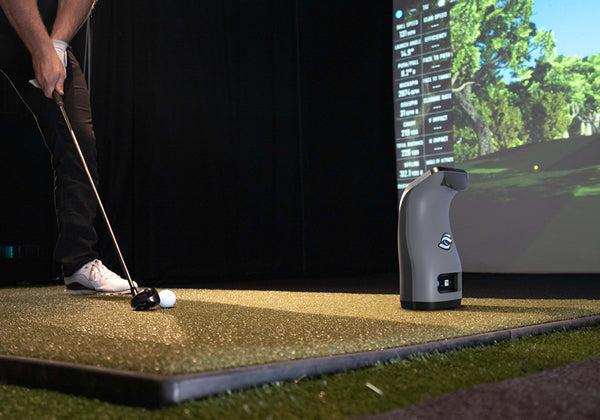
Three high-speed cameras photograph the ball and club through impact, so your numbers come from direct photometric measurement, indoors or out.
Ball speed, launch angles, spin, carry, plus club head speed, smash factor, angle of attack, and club path. All of it is included from day one.
Every new GC3 includes 30 days of Foresight+ Gold membership with Course Pass Pro. After that, choose Silver ($199/yr) or Gold ($599/yr) and add a Course Pass for the Foresight Premier course library.
The integrated LCD touchscreen shows your numbers right on the unit, so you can practice standalone with no phone or laptop required.
One Foresight+ membership runs Foresight Premier in the sim and the Foresight app on the range: course play in 4K, shot and club analysis, drills, and scorecards.
LINK-enabled technology pairs GC3 data with a Bushnell Pro X3, Pro X3+, or Pro X3+ LINK rangefinder for club recommendations built on your real tendencies.
Standard on every GC3: any standard golf ball, indoors and out.
The GC3 ships with club data unlocked. Place a marker dot from the included supply on the clubface and the cameras handle the rest.
Every new GC3 ships with 30 days of Foresight+ Gold membership with Course Pass Pro. After the trial, one annual membership runs Foresight Premier in the sim and the Foresight app on the range.
Foresight's simulation software for PC: course play in 4K, shot and club analysis, a drill library, and round setup with scorecards on the big screen.
The same account on your phone or tablet at the range: shot analysis, putt analysis, drills, and dispersion, tags, and zones views.
Silver ($199/yr) adds unlimited session history, dispersion views, drills, and Course Pass eligibility. Gold ($599/yr) adds swing video capture, multiple profiles, club comparison, and third-party integrations such as GSPro. Memberships are billed annually and membership sales are final.
Course Pass ($295/yr) covers 35 Premier courses; Course Pass Pro ($595/yr) unlocks the full library of 111. Either one needs a Silver or Gold membership.
Already own FSX Play, FSX Pro, or FSX 2020? That license keeps working. Courses you bought individually in FSX also play in Foresight Premier with a Silver ($199/yr) or Gold membership once Foresight converts them; courses that came with an old subscription tier stay in FSX. Prefer GSPro? The GC3 integrates with GSPro via a paid subscription (sold separately): if you already own FSX Play or FSX 2020, that license keeps working with GSPro, and new owners without an FSX license need an active Foresight+ Gold membership (trial memberships do not qualify).
The Foresight Premier library holds 111 courses, including top real-world courses rendered in 4K. Course Pass ($295/yr) includes 35 of them and Course Pass Pro ($595/yr) unlocks all 111; both need a Foresight+ Silver or Gold membership. Your 30-day trial includes Course Pass Pro, so you can play the full library before you choose.

With a MyBag Assessment, you hit at least 3 shots with each club in your bag to build personalized club dispersion patterns and stock yardages.
Pair the GC3 with a Bushnell Pro X3, Pro X3+, or Pro X3+ LINK laser rangefinder and that profile travels with you. The rangefinder uses your real GC3 data to recommend clubs on the course, so your practice numbers follow you from the sim room to the fairway.
You are building a sim room and want measured ball data, not estimates, driving the screen. The GC3 with Foresight Premier and a Course Pass is a complete simulation engine for the room you have been planning.
You practice with intent and want club data in every session. Angle of attack, club path, and smash factor are included out of the box.
You want the same measured numbers at the range as in the sim room. The touchscreen shows every shot at the tee, and MyBag data pairs with a Bushnell Pro X3, Pro X3+, or Pro X3+ LINK rangefinder for club recommendations on the course.
You need consistent ball and club numbers, fast setup, and a touchscreen workflow that works at the range or in the studio. A MyBag Assessment of every club in your bag makes gapping sessions routine.
In the box: GC3 Launch Monitor, 30 days of Foresight+ Gold membership with Course Pass Pro, power adapter and cable, GC3 sling bag, USB-C cable, alignment stick, and club markers.
PC requirements for Foresight Premier: Windows 10 or 11, Intel i5-12500, 16GB RAM, an SSD with 50GB available, and an RTX 4060 with 8GB VRAM at minimum. Standalone touchscreen practice needs no PC at all.

| Foresight GC3 ($6,999) | Bushnell Launch Pro ($2,999) | SkyTrak ST MAX ($1,695) | |
|---|---|---|---|
| Tracking | Triscopic 3-camera | Triscopic 3-camera | Photometric camera and dual Doppler radar |
| Ball Data | Included | Included | Included |
| Club Data | Included | Requires subscription (Silver or Gold) | Club head speed, smash factor, club path, face angle, face-to-path |
| Simulation Software | Foresight Premier via Foresight+ and a Course Pass; 30-day Gold trial with Course Pass Pro included | Foresight Premier via Foresight+ and a Course Pass; 30-day trial included | SkyTrak app; sim plans optional |
| Subscription Cost | Free tier for ball and club data; Silver $199/yr or Gold $599/yr, plus Course Pass $295/yr or Course Pass Pro $595/yr for the course library | Free tier for ball data; Silver $199/yr or Gold $599/yr for club data, plus Course Pass $295/yr or Course Pass Pro $595/yr for the course library | Optional, from $99.99/yr |
| Built-In Screen | Yes, touchscreen | Yes, touchscreen | No |
| LINK Rangefinder Pairing | Yes (Pro X3, Pro X3+, Pro X3+ LINK) | Yes (Pro X3+, Pro X3+ LINK) | No |
| Shot Delay | 0–1 s | 0–1 s | 2–4 s |
| Best For | Full ball and club data with a built-in touchscreen | Value triscopic with subscription | Budget sim builds |
Compare in depth: Foresight GC3S, Bushnell Launch Pro, and SkyTrak ST MAX, or browse all golf launch monitors.
Set the GC3 on level ground beside the hitting area with the cameras facing the ball. The included alignment stick squares it to your target line.
The built-in touchscreen shows ball and club data right on the unit. For standalone practice there is nothing else to set up.
Link the GC3 to your gaming PC over USB-C, Wi-Fi, or Ethernet and launch Foresight Premier for full-screen simulation.
Plan around 12'W x 9'H x 12'D for a comfortable indoor setup with full swings, screen, and hitting mat.
For club data, place a marker dot on the clubface and the cameras handle the rest. A supply comes in the box.
Hit at least 3 shots with each club, then pair a Bushnell Pro X3, Pro X3+, or Pro X3+ LINK rangefinder so it can recommend clubs from your real numbers.
Ships free in the contiguous 48 states. Financing available through Affirm.
Add to Cart - $6,999Explore our in-depth guides to compare the GC3 against its closest rivals.
Camera tech, Foresight+ software, specs, and pricing across every Foresight model to guide your purchase
See how four-camera tracking, club data, and price separate these two Foresight units for your space
Same hardware, different price: compare software memberships, accuracy, and what fits your budget
Match GC3, GCQuad, or QuadMAX to your room size, swing goals, and home simulator budget
Every new GC3 includes 30 days of Foresight+ Gold membership with Course Pass Pro. After the trial, ball and club data stay on the free tier, and course play in Foresight Premier needs Silver ($199/yr) or Gold ($599/yr) plus a Course Pass ($295/yr, 35 courses) or Course Pass Pro ($595/yr, all 111). Ball and club data on the unit stay available on the free tier. Memberships are billed annually and membership sales are final.
The GC3 package includes the GC3 launch monitor, 30 days of Foresight+ Gold membership with Course Pass Pro, a power adapter and cable, GC3 sling bag, USB-C cable, alignment stick, club markers, and a 2-year warranty.
Ball data: ball speed, horizontal and vertical launch angles, total spin, side spin and spin axis, and carry distance. Club data: club head speed, smash factor, angle of attack, and club path. All of it is included with the unit.
Yes. The built-in touchscreen displays ball and club data for standalone practice with no PC, phone, TV, or projector needed. A compatible Windows PC is required only for simulation in Foresight Premier or GSPro.
Ball data works with standard golf balls. For club data, place a marker dot from the included supply on the clubface and the cameras handle the rest.
Yes. The GC3 works indoors and outdoors, including at the driving range. The built-in touchscreen shows your numbers at the tee with no PC required, and MyBag data supports club recommendations through a Bushnell Pro X3, Pro X3+, or Pro X3+ LINK rangefinder.
The GC3 itself needs limited floor space beside the ball; for a complete indoor simulator setup we recommend a minimum of 12'W x 9'H x 12'D with room to swing. The exact requirements vary with the enclosure and mat you choose. Browse our golf simulator enclosures and golf simulator projectors, and our team can help you plan the room before you buy.
Foresight lists a minimum of Windows 10 or 11, an Intel i5-12500, 16GB of RAM, an SSD with 50GB available, and an RTX 4060 with 8GB of VRAM for 1080p at low settings. Foresight recommends Windows 11, 32GB of RAM, and a 1TB SSD, plus an Intel Ultra 7 and an RTX 5070 (12GB) for 1080p at medium, an Intel Ultra 7 and an RTX 5070 Ti (16GB) for 1080p at high, or an Intel Ultra 9 and an RTX 5080 (16GB) for 4K. Standalone touchscreen practice requires no PC.
Connect the GC3 to your PC via USB-C, Wi-Fi, or Ethernet, then link the PC to your projector or TV with an HDMI cable. The built-in touchscreen also works standalone for practice without any external display.
Both use the same triscopic three-camera tracking system. New GC3 units ship with ball and club data out of the box and 30 days of Foresight+ Gold membership with Course Pass Pro, with no rangefinder. The Foresight GC3S costs less, $3,799 against $6,999, and while our stock lasts it ships with a Bushnell Pro X3 LINK rangefinder and the first year of the Gold Subscription with FSX Play, which new Foresight launch monitors no longer include.
The Launch Pro also uses triscopic three-camera tracking and sells for less, and both units run on the same Foresight+ memberships. The GC3 is the Foresight-branded unit with a 2-year warranty and a sling bag, and its club data is on the free Foresight+ tier; on the Launch Pro, club data needs Silver or Gold. See our full Launch Pro vs GC3 comparison for the detailed breakdown.
No. The GC3 is available to U.S. customers only. All products are shipped and sold only to U.S. credit card bearers and U.S. addresses, and the device will not work outside the U.S.
Yes. Top Shelf Golf offers financing through Affirm with flexible monthly payment options. Select Affirm at checkout to check your rate; it takes seconds and won't affect your credit score.
All six: Net, Floating Screen, DIY Enclosure, Pro Enclosure, Curved Screen and Built-In Screen. The GC3 sits beside the ball instead of behind you, so it adds nothing on top of each format's own room depth: at least 16 ft 0 in for the Pro Enclosure and the Curved Screen; 16 ft 9 in, with 18 ft 9 in for a full driver swing for the Carl's DIY kit; and 14 ft, with 18 ft for a full driver swing for a floating-screen bay.
Only what the enclosure itself needs: at least 16 ft 0 in in the Pro Enclosure or the Curved Screen; 16 ft 9 in, with 18 ft 9 in for a full driver swing in the Carl's DIY enclosure; and 14 ft, with 18 ft for a full driver swing in a floating-screen bay. Carl's plans a Built-In room as 12 in behind the screen for buffer space plus 6 in to install the flaps, at least 10 ft from the screen and 7 ft of swing room in every direction. The GC3 sits beside the ball, level with the hitting surface, so it adds no depth behind you.
Yes, at a room depth of at least 16 ft 0 in. Carl's curved kits run 14 ft to 17 ft wide, which leaves room on either side of a centered tee for the GC3 beside the ball.
Not necessarily. A battery that sat on the shelf a long time without power can lose its calibration, so it stays at 0% after charging, jumps to 100% too fast, or drains too quickly. Foresight's firmware has a battery calibration you run yourself from the touchscreen, and it fixes a lost calibration:
Step 1. Check that the GC3 runs Foresight firmware V1.14.4.91 or later, which adds the calibration.
Step 2. Tap the battery icon on the main menu to open Battery Info, then swipe left to the Battery Calibration screen.
Step 3. If the screen asks, charge or discharge the battery until it is between 7 and 8 volts. The Start button then appears.
Step 4. Tap Start and plug in the wall charger. The unit charges to full.
Step 5. When prompted, unplug the charger. The discharge phase can take up to 8 hours and ends with the unit shutting itself off.
Step 6. Plug the charger back in to restart. Battery Info should read STATUS 1 0 0 0 0. Any other value means run the calibration again or contact Foresight technical support.
Foresight's support article "Battery Recharacterization Process" for the GC3, GC3S and Launch Pro shows each screen. The battery is at 0% when calibration finishes, and you do not need to charge it to 100% before using it.
The GC3 carries a 2-year manufacturer warranty from Foresight Sports. All Foresight Sports products have a 30-day return window with prior return authorization (RMA) and a 15% restocking fee, plus the cost to repair or replace any damaged, worn or missing components. Items must be returned in the original packaging, and the customer pays return shipping. Opened software and downloaded software licenses are not returnable.
Still comparing? Browse all golf launch monitors or our Foresight simulator packages, or call us at 1-888-871-6110
| Package | Net | Floating Screen | DIY Enclosure | Pro Enclosure | Curved Screen | Built-In Screen |
|---|---|---|---|---|---|---|
| Package price from | $8,293.00 | $10,001.00 | $10,765.90 | $12,975.95 | $17,055.95 | $9,806.00 |
| Net, screen or enclosure | Net, 4.5' to 10' wide | Floating impact screen, 8', 10' or 12' wide | DIY enclosure, 8' to 13' wide | Pro enclosure, 10.5' to 15.5' wide | Curved enclosure, 14' to 17' wide | Built-In screen sewn to your wall, 8' to 20' wide |
| Min room (W x H x D) | The net's size, 16' deep | 10' W x 9' H x 16' D | 8' 10" W x 8' 7" H x 16' 9" D | 11' 7" W x 8' 9" H x 16' D | 14' 4" W x 9' 6" H x 16' D | 10' W x 9' H x 18' D |
| Hitting mat | Included | Included | Included | Included | Included | Included |
| Projector | Not included | Included | Included | Included | Included | Included |
| Software | Foresight Premier (30-day Foresight+ Gold trial with Course Pass Pro), with the GC3 in every package | |||||
Recommended for the GC3, priced $4,999 and up: the Pro Enclosure and the DIY Enclosure, our best seller. Min room: the smallest size of each package, with the depth and ceiling the GC3 needs.
Overall rating: 5.0 / 5 from 14 reviews.
Tons of fun! Great swing practice and great for family fun! Appears accurate unless you take a bit too much turf. High quality graphics and a centerpiece to a boys night!

5 stars to TopShelf golf! Love the Foresight GC3, worth every penny. Excellent purchase through TopShelf, quick shipping and great communication. You guys are doing customer service the correct way! Thanks, Dave R
Foresight Sports GC3 Launch Monitor and Golf Simulator w/ FSX 2020 + Play Software
Very quick shipping and great after service. Also great price..
Foresight Sports GC3 Sim-In-A-Box Birdie PLUS Golf Simulator Package

I purchased the GC3 Foresight through Top Shelf. The bay I purchased directly from Net Return and the Epson 2250 projector came from Best Buy. I already owned the mat as I was hitting into a GoSports net. After reviewing the total package price from Top Shelf I determined I was able to save money by purchasing each item separately instead of getting the complete package offered on their website. I spoke with Top Shelf about the cost difference (particularly the net) and their response was quick and polite. Essentially they informed me that the manufacturer forced them to not provide discounts. Personally that harms Top Shelf's business because the manufacturer did provide a discount to me directly but they apparently don't pass on the discount through a 3rd party seller. It isn't fair to Top Shelf honestly. As for the GC3 monitor it was bought from Top Shelf. It lasted only 3 days before needing repair. It stopped turning on, and I was required to send it to Foresight as Top Shelf would not exchange the unit. That resulted in a 3 week hiatus which was a bit frustrating after spending a great deal of money. Top Shelf did provide me with Foresights directly line for technical support as I was unable to locate one on Foresight's website. That turned out to speed up the repair process immensely. Foresight determined that the I/O board was bad, and that seems to be a known issue after discussions with Foresight. They replaced the board with something newer and then returned it with overnighted shipping. Foresight did try their best to speed up the process considering the unit was brand new with hardly any use, including the speedy return shipping. As the video shows I have a size issue with our room. I needed a Bay to fit inside the house on our second floor in a fairly small space. Fortunately Net Return made a bay that would fit that space. They were the only manufacturer I could find that produced a bay that was only 8 feet wide and under 9 feet high. The one downside to the design however is the white curtain. The top has a Velcro strip sown all the way across that is utilized to attach the top portion of the net. The end result is a curtain that will not hang flat, but more like a draped curtain with minor folds. You can see them in the video. No amount of ironing, etc. will get them removed as it's a problem when you sow two different materials together. I was however able to attached some extra Velcro strips between the upper side polls and the curtain that provides extra tension. This helped reduce the size and number of the folds, but did not remove them entirely. The Epson projector is located on the right side wall and to the rear. I didn't require a short throw, so that saved me some $$. It is also plenty bright, plus has very good clarity and contrast. The full setup did take some extensive time to finalize as I need a specific throw ratio, keystone, brightness, and zoom capability to have the screen size work correctly for the space. I went through 2 additional projectors trying to find something that would work. Ultimately the Epson fit the bill perfectly and is below $1000. The PC setup is a Dell Precision Workstation with an Nvidia GeForce RTX 2060 12GB video card I also bought off Amazon. It runs incredibly fast as you can tell in the video and for the price it can't be beat. Like the other items above I researched this heavily. I wanted the simulator to respond quickly with no delay. So far I have been testing different balls spin rates and compressions to find the perfect ball for me. My Driver swing speed is around the 107 mph mark. I have since adjusted my driver, 3 wood, and 3 hybrid settings to get more distance and less spin. I have about 10-12 yards more on my driver, 5+ yards on both my 3 wood and 3 hybrid. I would buy everything above again using the exact same companies. Getting the entire setup perfect took me about 2 weeks total, and that obviously doesn't include the three weeks down time without the simulator. If you have a small space then this setup would be perfect. You will need about 11 feet of depth for this projector and the bay, which includes enough space for a full swing of the driver. If you use a short throw you could probably get everything to work within 10ft. Hopefully this review helps someone with the same challenges as I had. I was unable to find any real help online. The products are solid, work well, and the companies all responded to inquires fairly quickly. No one acted as if they would rather be doing something else each time we spoke. Everyone was very professional. The only reason for the 4 stars instead of 5 is 1) the price issue, 2) the GC3 needing warranty work, 3) the net design could be altered slightly to allow the curtain to hang flat.
Foresight Sports GC3 Launch Monitor and Golf Simulator w/ FSX 2020 + Play Software

The great benefit of GC Quad compared to other high quality equipment is how easy you can set up the GC Quad. You simply turn it on, align it to your target with the furnished alignment stick and boom, read to use it. Despite how easy to set it up, it is super accurate for swing speeds from 60 to 120 mph.
Foresight Sports GCQuad Launch Monitor and Golf Simulator w/ FSX 2020 + Play Software

gc3 is an incredible launch monitor with extremely accurate yardages. I would recommend this entire setup for any golfer looking to practice more and improve your game dramatically. This video includes - gc3, fiberbuilt 4x6 tee box, and perfectbay simulator bay 10.5 by 8.
Foresight Sports GC3 Launch Monitor and Golf Simulator w/ FSX 2020 + Play Software
If you plan to buy anything related to a golf simulator and the equipment needed, there is no better place than speaking with Ivan at Top Shelf Golf. His knowledge and customer service is unmatched.
Foresight Sports GC3 Launch Monitor and Golf Simulator w/ FSX 2020 + Play Software

Top Shelf Golf has excellent customer service. The lead time for the GCQuad was significantly shorter at Top Shelf Golf than the 3 competitors that I called. Top Shelf Golf is going to get my future business and I highly recommend them to others.
Foresight Sports GCQuad Launch Monitor and Golf Simulator w/ FSX 2020 Software
Ivan at Top Shelf Golf kept me well informed about the status of my order. This was very helpful during these times of "supply chain issues." I love my GC Quad! I would certainly buy again from Top Shelf Golf!
Foresight Sports GCQuad Launch Monitor and Golf Simulator w/ FSX 2020 Software
Top Shelf was great... They answered all of my questions be for my purchase and made the entire process easy as can be. They even shipped my order to Oregon so I could save $900 in California taxes
Foresight Sports GC3 Launch Monitor and Golf Simulator w/ FSX 2020 + Play Software

Fantastic service from the top shelf golf. Ivan communicated very well. Feels like you are getting an MRI scan of your ball data and club data. Best quality data, Very well built, Very easy to use out of the box. My son loves his new GCquad Golf simulator. Thanks again, A very satisfied customer
Foresight Sports GCQuad Launch Monitor and Golf Simulator w/ FSX 2020 Software
The perfect option for a garage installation which can be easily set up and dismantled. The Foresight simulator software and the GCQuad are beyond cool.
Foresight Sports GCQuad Retractable Screen Golf Simulator Package

I can’t say enough about the service and communication of top shelf golf. They were constantly updating me on the status of my order. My son loves his new GCquad Golf simulator. Thanks again, A very satisfied customer
Works great
Foresight Sports GCQuad Launch Monitor and Golf Simulator w/ FSX 2020 Software