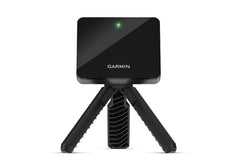
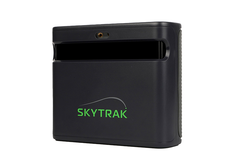
The SkyTrak ST MAX costs $1,695. The Garmin Approach R10 costs $499.99. On paper, they compete in the same category — portable launch monitors for serious amateurs. In reality, they are different tools built on different measurement technologies, sold to different buyers. Choosing the wrong one is a $1,195 mistake.
This guide cuts through the spec-sheet noise. We verified every number against Garmin's official manual and skytrakgolf.com on April 16, 2026, and we break down where each launch monitor actually wins — not just on the spec sheet, but in the garage, basement, and driveway.
Quick Answer: Which Is Better for You?
Get the Garmin R10 ($499.99) if you primarily want to practice outdoors at the range, track real ball flight, and occasionally play simulator golf with Garmin's Home Tee Hero or an outdoor driving-range app. The R10 is radar-based, tiny, all-weather, and has a 10-hour battery. It's the best sub-$1,000 launch monitor for an outdoor-first player.
Get the SkyTrak ST MAX ($1,695) if you are building an indoor simulator bay and want tour-level ball spin data, access to the SKYTRAK App with licensed Foresight and TrackMan course libraries, and a measurement system that doesn't depend on ball flight distance. The ST MAX is a photometric camera unit with a secondary Doppler radar for club data, so it measures spin from any ball and reads the club without stickers.
The $1,195 price gap ($1,695 against $499.99) reflects a real capability gap: directly measured spin data, a bigger software ecosystem, and indoor-first design. For an outdoor range rat, it's overkill. For someone committing to an indoor bay, it's the floor of serious hardware.
Price Reality Check: What You Actually Pay
Both launch monitors have simple standalone pricing. The real cost comparison shows up when you factor in what you'll actually buy alongside them.

| Cost | Garmin Approach R10 | SkyTrak ST MAX |
|---|---|---|
| Launch monitor price | $499.99 | $1,695 |
| Recommended subscription (year 1) | Garmin Golf $99.99/yr ($9.99/mo) for Home Tee Hero | SKYTRAK App Essential $99.99/yr (Foresight & TrackMan course libraries) |
| Indoor net/mat add-on | $150 – $400 | $300 – $1,000 (larger enclosure) |
| PC required? | No — runs on phone/tablet | No — SKYTRAK App runs on iPad, Mac, or PC |
| Realistic first-year entry cost | $749.98 to $999.98 | $2,094.99 to $2,794.99 |
The $1,195 hardware gap grows to between $1,345 and $1,795 once you add subscriptions and accessories. If budget is the constraint, the R10 is the only sensible choice. If you are prioritizing fidelity and your bay budget is already $4,000+, the ST MAX hardware is a rounding error on the total build.
Technology: Doppler Radar vs Photometric Camera
This is where the two launch monitors genuinely diverge. The measurement technology determines everything downstream — accuracy, room requirements, indoor vs outdoor behavior, and which data you can actually trust.

- Garmin R10 — Doppler radar (dual-band, 2.4 GHz + 24 GHz). Sits 6–8 ft behind the ball and tracks the ball's flight with radar waves bouncing off the ball and club. Needs the ball to actually fly for long enough to get a reliable reading. Outdoors, this is unlimited — the ball flies, radar tracks it to the ground. Indoors, the ball stops when it hits the net, so radar has very little flight window to work with.
- SkyTrak ST MAX: photometric camera, plus a Doppler radar for the club. Sits beside the ball. The camera captures high-speed images of the ball as it leaves the clubface, and this works the same indoors or outdoors because measurement happens in the first few inches of ball flight. The radar reads only the club head through impact, which is how the ST MAX gets club data with no stickers. It never tracks the ball.
Why this matters: photometric systems excel indoors because they don't need flight distance. Radar systems excel outdoors because they track the full ball flight. The ST MAX's camera works the same in both environments because it reads the ball at impact. The R10 is primarily an outdoor tool that Garmin also lets you use indoors — with limitations we'll cover below.
Data Comparison: Ball and Club Metrics Side by Side
Here's exactly what each launch monitor reports.

| Data Point | Garmin R10 | SkyTrak ST MAX |
|---|---|---|
| Ball speed | Yes | Yes |
| Launch angle | Yes | Yes |
| Launch direction / side angle | Yes | Yes |
| Total spin | Outdoors: tracked via radar ball-flight. Indoors: directly measured only with Titleist RCT ball; calculated otherwise | Yes |
| Spin axis / side spin | Calculated from ball flight | Yes (Back Spin and Side Spin separately) |
| Carry distance | Yes | Yes |
| Total distance | Yes | Yes |
| Descent angle | Not published | Yes |
| Shot shape (draw/fade) | Yes | Yes |
| Club head speed | Yes (measured directly via radar) | Yes |
| Club path | Yes (measured directly via radar) | Yes |
| Face angle / face-to-path | Not published | Yes |
| Smash factor | Calculated from ball and club speed | Yes |
Two things worth understanding from this table:
- Both measure club path and club speed directly with radar. The R10's radar sees the club head crossing its beam from behind the ball; the ST MAX's secondary radar does the same from beside the ball. Neither needs club stickers for it, which most camera-only systems do.
- The ST MAX measures ball spin directly; the R10 calculates it. Indoors, without a Titleist RCT ball, R10 spin numbers are inferred from launch direction and path — they can still be useful, but they are not measurements. The ST MAX's camera captures spin regardless of ball model or ball flight distance.
Spin Accuracy: The Titleist RCT Ball Question
This is the single biggest caveat in the R10 spec sheet and almost every competitor comparison buries it. Per Garmin's own support documentation:

- Outdoors: the R10 measures total spin by tracking the ball in flight and calculates spin axis from ball flight and club path. Real-world outdoor numbers from R10 owners generally land within a few hundred rpm of TrackMan on iron shots — reasonable for a $499.99 radar.
- Indoors (standard ball): total spin is calculated from launch direction and club path, not measured. Accuracy varies meaningfully.
- Indoors (Titleist RCT ball): the R10 reads radar-reflective metal particles inside the Pro V1 RCT cover and directly measures total spin. Garmin's own claim is "up to 30 times more accurate" spin rate readings and "up to a 50-percent increase in carry distance accuracy" with RCT balls indoors.
The SkyTrak ST MAX does not require any special ball to measure spin indoors or out. Its camera captures the spin directly from any ball with standard markings; the radar plays no part in ball data. For indoor range sessions focused on dialing in wedge spin or shaping shots, the ST MAX is the more honest tool — you can trust what it shows without swapping balls.
Neither Garmin nor SkyTrak publishes specific numeric accuracy tolerances (±mph, ±rpm, ±yards) on their official sites. Any competitor comparison citing precise numbers is quoting third-party testing, not the manufacturer.
Room Requirements: Indoor Setup Compared
Different measurement technologies mean different room layouts. Plan your space before you buy — neither launch monitor works in a room it doesn't fit.

| Requirement | Garmin R10 | SkyTrak ST MAX |
|---|---|---|
| Device placement | 6 – 8 ft behind the tee | Beside the ball, about 1 ft to the side |
| Tee-to-net distance | At least 8 ft | Depends on enclosure — typically 10+ ft |
| Total room depth | ~15 – 16 ft minimum | ~12 – 16 ft depending on layout |
| Minimum indoor footprint | Not officially specified | 10 ft x 10 ft minimum (per skytrakgolf.com) |
| Ceiling height | Not officially specified by Garmin — most owners report 9 ft+ is comfortable | Not officially specified — 9 ft is standard for full-driver swings |
| Hitting zone size | 2 ft x 2 ft per Garmin manual | 4 ft x 5 ft typical for full swings |
| Portable between rooms? | Yes — 5.2 oz, fits in a pocket | Less portable — larger unit, tripod setup |
If your bay has a 9-ft ceiling and 15 ft of depth, either will work. If you are squeezing into a garage with 8 ft of ceiling, measure carefully and expect to clip the occasional driver. The R10's placement behind the golfer means the club swings above it — its own footprint isn't the limiting factor; ball flight and your own swing are.
Software Ecosystems: What You Can Play
The launch monitor itself is half of the system. The other half is what it connects to. Here's the honest state of each ecosystem in 2026.

Garmin R10 software
- Garmin Golf app (iOS/Android) — free with device. Stat tracking, shot history, club averages, screen mirroring to a smart TV for living-room play. This is the R10's main experience.
- Home Tee Hero — Garmin's simulator inside the Garmin Golf app. 43,000+ virtual courses per Garmin's product page, requires a Garmin Golf membership ($9.99/mo or $99.99/yr). No PC required; runs on phone/tablet paired via Bluetooth.
- Third-party simulators — Garmin's manual references an "Other Simulators" menu in the app for compatible third-party sims. Historical integrations include E6 Connect and Awesome Golf. GSPro compatibility is not supported by Garmin and community workarounds are unreliable.
SkyTrak ST MAX software
- SKYTRAK App (Windows/macOS/iOS/Android) — SkyTrak's own companion. Course play via Foresight and TrackMan-licensed course packs, GOLFTEC-designed Improvement Ranges, Skill Challenges, PinSeeker contests. Tiered membership: Essential $99.99/yr, Core: Foresight $299.99/yr, Core: TrackMan $349.99/yr, Elite $599.99/yr.
If you want serious simulator golf — league play, tournament formats, hyperrealistic courses — the ST MAX is in a different class. The R10's Home Tee Hero is a legitimate, capable experience for casual play on a TV, but it's not in the same conversation as a dedicated indoor simulator bay running the SKYTRAK App.
5-Year Total Cost of Ownership
The $1,195 price gap at purchase looks different over five years of ownership. Here's a realistic projection for a typical indoor-simulator user.

| Line Item | Garmin R10 (5 yr) | SkyTrak ST MAX (5 yr) |
|---|---|---|
| Hardware (year 1) | $499.99 | $1,695 |
| Garmin Golf subscription (Home Tee Hero) | $499.95 ($99.99/yr) | N/A |
| SKYTRAK App Essential tier | N/A | $499.95 |
| Titleist RCT balls (R10 indoor spin) | $300 – $500 over 5 years | N/A |
| 5-year total (minimum indoor setup) | $1,299.94 to $1,499.94 | $2,194.95 |
Over five years, the R10 stays $695 to $895 cheaper than a simple ST MAX indoor build ($1,299.94 to $1,499.94 against $2,194.95). Subscriptions are the quiet cost on both sides. Factor them in before committing.
Who Should Buy Which: Persona Decision Framework
If the two launch monitors were truly interchangeable, every buyer would pick the cheaper one. They aren't. Here's how the decision actually plays out across common buyer profiles.

- Outdoor range rat — drives to the range 2-3x per week, wants real ball flight data, occasional indoor play on a TV. Winner: R10. The radar is built for this use case, battery lasts all day, pocket-sized.
- Casual indoor simulator owner — 8-ft ceiling garage, plays on weekends, doesn't care about tour-data precision. Winner: R10. Home Tee Hero's 43,000 courses are plenty, and the $1,195 saved pays for the enclosure.
- Serious indoor simulator owner — dedicated basement bay, 9-ft+ ceilings, wants photorealistic courses, online tournaments, trustworthy wedge data. Winner: ST MAX. The camera handles indoor spin without special balls, and the SKYTRAK App's licensed Foresight and TrackMan course libraries are in a different league.
- Aspiring teaching pro / coach — needs consistent data across every student, every ball, every session. Winner: ST MAX. You can't coach indoor wedge spin with an R10 unless every student brings Pro V1 RCTs.
- Traveling player / "I want both worlds" — range practice outdoors, living-room putting on a TV, no permanent bay. Winner: R10. Portability is the killer feature here; the ST MAX is not something you throw in a carry-on.
- Buyer who will upgrade within 2 years — torn between spending $499.99 now or $1,695 now. Winner: skip both and save for a Bushnell Launch Pro or Foresight GC3. If you are going to outgrow the R10 in 18 months, the $499 isn't "savings" — it's a down payment you throw away.
The bluntest way to frame the decision: if your simulator bay budget is under $3,000 total, buy the R10 and spend the rest on a solid enclosure and a big screen. If your bay budget is $5,000+, the ST MAX hardware is the right floor and leaves room for everything else.
Shop the Launch Monitors

Garmin Approach R10
Pocket-sized Doppler radar built for outdoor practice and casual living-room simulator golf. 43,000+ virtual courses via Garmin Golf, no PC required.
Shop Garmin R10 →
SkyTrak ST MAX
Photometric camera for the ball, Doppler radar for the club. Indoor-first design with full ball spin data, no special balls required, and access to the SKYTRAK App with licensed Foresight and TrackMan course libraries.
Shop SkyTrak ST MAX →Related Guides
- SkyTrak ST MAX Launch Monitor: Full Feature Breakdown
- SkyTrak ST MAX vs Bushnell Launch Pro: 2026 Comparison
- Browse SkyTrak Simulator Packages
- Garmin R10 DIY Enclosure Simulator Package