





Uneekor All-In-One Golf Simulator Packages: What's Included & How to Choose
Uneekor All-In-One Golf Simulator Packages
Building a golf simulator from scratch means sourcing a launch monitor, enclosure, screen, mat, projector, and mount -- all from different brands, hoping everything works together. Uneekor All-In-One packages solve that. Every component hand-selected for compatibility, bundled at a better price, and shipped as a single order.
- 5 complete packages -- one for every Uneekor launch monitor, starting at $7,649
- 6+ components included -- launch monitor, enclosure, screen, mat, landing pad, projector + mount
- Two room sizes -- choose the enclosure that fits your space
- Optional gaming PC add-on -- SurfThing pre-configured for simulator use
- Free shipping + Affirm financing -- from an Authorized Uneekor Dealer

What's Included in Every Uneekor All-In-One Package
Same carefully curated components in every package. The only variable is which launch monitor sits at the center.

Uneekor Launch Monitor
Your chosen model -- EYE MINI LITE, MINI, XR, XO, or XO2

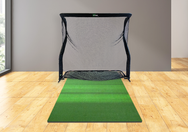
Carl's Place DIY Enclosure
Full frame with side nets, safety baffles, and foam insert kit

Premium Impact Screen
Triple-layer screen -- absorbs driver-speed impacts, smooth projection surface

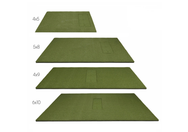
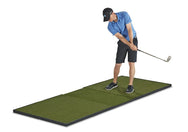
Fiberbuilt 8'W x 4'L Performance Turf
Floating deck design flexes on impact -- tour-quality feel, reduced joint stress

Optoma ZW350ST Projector + Mount
Short-throw laser, 30,000-hour life, instant on/off, ceiling mount included

Tour Golf Landing Pad
Cushions the ball behind the screen -- reduces noise and protects your setup
All Five Uneekor All-In-One Packages
Floor-Mounted Packages
EYE MINI LITE All-In-One
Complete Uneekor simulator for under $8,000. The MINI LITE tracks 19 data points with Club Optix -- no stickers, no subscriptions. Paired with Carl's Place enclosure, Fiberbuilt mat, and Optoma laser projector.
View Package - $7,649+
EYE MINI All-In-One
Pairs the only portable Uneekor with a full enclosure. Use the EYE MINI at the range, then dock it in your simulator for course play at home. Best of both worlds.
View Package - $9,399+Overhead-Mounted Packages

EYE XR All-In-One
Most affordable overhead package. Dimple Optix means instant L/R switching. PoE keeps the ceiling wiring clean. Everything included to go from empty room to simulator.
View Package - $11,899+
EYE XO All-In-One
Our top recommendation. 24 data points, high-speed cameras, proven reliability -- all bundled with premium components. Professional-grade home simulator in a single purchase.
View Package - $12,899+
EYE XO2 All-In-One
Maximum performance package. 28" x 21" hitting zone, 24 data points. Built for commercial studios, teaching pros, and home users who want the absolute best.
View Package - $15,899+Package-by-Package Specification Comparison
| Feature | MINI LITE All-In-One $7,649+ |
MINI All-In-One $9,399+ |
XR All-In-One $11,899+ |
XO All-In-One $12,899+ |
XO2 All-In-One $15,899+ |
|---|---|---|---|---|---|
| Launch Monitor | EYE MINI LITE | EYE MINI | EYE XR | EYE XO | EYE XO2 |
| LM Price (standalone) | $2,749 | $4,500 | $6,999 | $8,000 | $11,000 |
| LM Placement | Floor | Floor (Portable) | Rear Overhead | Overhead | Overhead |
| Data Points | 19 | 19 | 19 | 24 | 24 |
| Stickers | No | Yes (Club) | No | No | No |
| L/R Switching | Manual | Manual | Instant | Instant | Instant |
| Hitting Zone | Fixed | Fixed | 13.7" x 11.8" | 12" x 16" | 28" x 21" |
| Enclosure | Carl's Place DIY | Carl's Place DIY | Carl's Place DIY | Carl's Place DIY | Carl's Place DIY |
| Screen | Triple-Layer | Triple-Layer | Triple-Layer | Triple-Layer | Triple-Layer |
| Mat | Fiberbuilt 8'x4' | Fiberbuilt 8'x4' | Fiberbuilt 8'x4' | Fiberbuilt 8'x4' | Fiberbuilt 8'x4' |
| Projector | Optoma ZW350ST | Optoma ZW350ST | Optoma ZW350ST | Optoma ZW350ST | Optoma ZW350ST |
| Ceiling Mount | Included | Included | Included | Included | Included |
| Optional PC | SurfThing | SurfThing | SurfThing | SurfThing | SurfThing |
| Software | View (Free) | View (Free) | View (Free) | View (Free) | View (Free) |
| Best For | Budget complete sim | Portable + enclosure | Entry overhead pkg | Flagship all-inclusive | Max performance |
All-In-One Package vs. DIY Component Build
All-In-One Package
- Every component tested for compatibility
- Better bundled pricing vs. individual retail
- Single order, single shipment
- Expert support for the complete system
- Affirm financing on the full package
- No risk of wrong screen size or projector throw
DIY Component Build
- Full control over every component choice
- Reuse equipment you already own
- Mix premium and budget parts
- Upgrade individual components over time
- Works if you just need the launch monitor
- Choose your own projector, mat, screen
Our recommendation: Starting from zero? The all-in-one package is the easiest path. Already own components? Buy the standalone launch monitor and fill gaps individually.
Room Requirements
| Dimension | Minimum | Recommended | Notes |
|---|---|---|---|
| Ceiling Height | 9 feet | 10+ feet | Most critical -- must swing driver freely |
| Room Width | 10 feet | 12+ feet | Enclosure + clearance on both sides |
| Room Depth | 15 feet | 18+ feet | Enclosure depth + space behind golfer |
Common locations: basements, garages, spare bedrooms, dedicated sim rooms. Most popular setup is a basement or garage with at least 9-foot ceilings. For overhead models, factor in 4-6 inches of unit depth below the ceiling.
For projector mounting guidance, read our Projector Placement Guide.
Setting Up Your All-In-One Package
Most packages can be assembled in a weekend. Here is the installation order:
1. Assemble Enclosure
Build the Carl's Place frame, install side nets, safety baffles, and foam inserts. Allow 2-3 hours for a first-time build.
2. Mount Impact Screen
Attach the triple-layer screen to the enclosure front. Ensure it is taut and centered for image quality and impact absorption.
3. Position Hitting Mat
Place the Fiberbuilt mat inside the bay. Center the ball in the launch monitor's field of view. Landing pad goes behind the screen.
4. Install Projector
Ceiling mount the Optoma ZW350ST. Aim at screen, adjust focus and keystone. Short-throw means it mounts close to the screen.
5. Mount Launch Monitor
Floor models: position beside ball. Overhead: install ceiling bracket, mount unit, run cables. XR supports PoE for single cable.
6. Connect & Calibrate
Connect to PC, run View Software, calibrate. Then connect your simulator software (GSPro, E6). Hit a few shots to verify.
What You'll Need After the Package
View Software (free driving range + data) is included. For course play, you need:
Uneekor Pro subscription ($199/year) -- Unlocks third-party software integration
Third-party software license -- GSPro, E6 Connect, TGC 2019, or Creative Golf 3D (purchased from the provider)
For complete software tier breakdown, read the Complete Uneekor Guide.
Frequently Asked Questions
Every package includes: Uneekor launch monitor (your chosen model), Carl's Place DIY Enclosure with side nets and safety baffles, triple-layer premium impact screen, Fiberbuilt 8'W x 4'L Performance Turf, Tour Golf landing pad, and Optoma ZW350ST 1080p laser projector with ceiling mount. A SurfThing Gaming PC is available as an optional add-on.
Packages range from $7,649 (EYE MINI LITE) to $16,499 (EYE XO2 with optional PC). Base prices: MINI LITE All-In-One $7,649, MINI All-In-One $9,399, XR All-In-One $11,899, XO All-In-One $12,899, XO2 All-In-One $15,899. Adding a SurfThing PC increases the price by approximately $600.
The All-In-One package is typically better value than sourcing each component at individual retail. If you already own some components (enclosure, projector, mat), buying the standalone launch monitor makes more sense.
Yes. All Uneekor launch monitors require a Windows PC. The optional SurfThing add-on is pre-configured for simulator use. If you already have a gaming PC with NVIDIA GTX 1660 or better, you're set.
Minimum: 9-foot ceilings, 10 feet wide, 15 feet deep. Recommended: 10+ foot ceilings, 12+ feet wide, 18+ feet deep. Basements and garages with adequate ceiling height are the most common locations.
Yes. The Carl's Place enclosure is designed for DIY assembly (2-3 hours). Floor-mounted launch monitors plug in. Overhead models require ceiling mounting -- some customers prefer professional installation. View Software guides calibration.
View Software (virtual driving range + data) is included free. For course play with GSPro, E6 Connect, or TGC 2019, you need a Pro subscription ($199/year) and a separate software license. Neither is included in the package price.
The EYE XO All-In-One ($12,899+) is our top recommendation. For budget buyers, the EYE MINI LITE All-In-One ($7,649+) is the best value complete simulator available.
Yes. Affirm financing with terms from 3 to 36 months. Check your rate at checkout with no credit score impact. For example, the EYE MINI LITE All-In-One at $7,649 could start under $300/month.
Each component carries its manufacturer warranty. The Uneekor launch monitor is returnable within 15 days of license activation or 60 days of receipt. Top Shelf Golf handles all warranty support as an authorized dealer. Contact 1-888-871-6110 or support@topshelfgolf.com.
Your Purchase is in Good Hands
1-888-871-6110
Ready to build your simulator? Browse all Uneekor packages or call us at 1-888-871-6110