

By placing an order, you are agreeing to our privacy policy and terms of service.
- Portable & Battery Powered: 8 lbs, 6-8 hour battery, indoor/outdoor
- Dimple Optix Technology: Dual cameras, impact replay video
- 19 Data Points: Full club + ball data, no subscription required
- GSPro, E6, TGC Compatible: Works with all major sim software
- View Software Included: Free driving range + data display
 Complete Package
Uneekor EYE MINI DIY Enclosure Golf SimulatorLaunch monitor + enclosure + screen + mat + projector
From $6,765.90 →
Complete Package
Uneekor EYE MINI DIY Enclosure Golf SimulatorLaunch monitor + enclosure + screen + mat + projector
From $6,765.90 →
Uneekor EYE MINI Launch Monitor & Golf Simulator
The Uneekor EYE MINI is a portable, floor-mounted launch monitor that delivers accurate club and ball data using dual high-speed cameras and Dimple Optix technology. At $2,999, it brings Uneekor precision to a compact, portable form factor.
12" x 8" hitting zone — floor-mounted for easy setup anywhere. Battery powered with 6-8 hours of play. Works indoors and outdoors. Compatible with GSPro, E6 Connect, TGC 2019 and more. Includes View Software with virtual driving range.

What Sets the EYE MINI Apart
Dimple Optix Technology
Dual high-speed cameras capture ball data with precision. Track ball speed, spin, launch angle, and carry distance with every shot: no special balls required.
Portable & Battery Powered
Take it anywhere. The EYE MINI weighs just 8 lbs and runs 6-8 hours on a single charge. Practice indoors, outdoors, at the range, or at home.
Impact Replay Video
See your club strike the ball in high-speed slow motion. Club Optix gives you visual feedback on every impact to identify mishits instantly.
GSPro, E6 & TGC Compatible
Connect to the world's best golf simulation software. Play thousands of courses with accurate shot simulation powered by EYE MINI data.
View Software Included
Every EYE MINI includes Uneekor View Software: a virtual driving range with full data display, shot history, and performance tracking at no extra cost.
All Data Included
All data and View Software are included from day one. No monthly fees, no unlock charges, no paywalls on ball or club data.
Is the EYE MINI Right for You?
Portable Practice Player
You want pro-level data at the range, at home, and on the road. The battery-powered EYE MINI goes wherever your game takes you.
First Simulator Builder
You are building your first home sim setup and want Uneekor accuracy without the overhead mounting requirement or the overhead price tag.
Data-Focused Improver
You want ball speed, spin, launch angle, and club data on every shot. The EYE MINI gives you 19 data points to identify what is working and what is not.
Indoor/Outdoor Golfer
You practice indoors in winter and outdoors in summer. The EYE MINI's portable design means one launch monitor for every setting.
EYE MINI Club Metrics
Club data tracked with every swing. Club stickers recommended for accurate club data.
What the EYE MINI Tracks on Every Shot
Dimple Optix technology captures ball flight data with dual high-speed cameras: no special balls required.
EYE MINI vs EYE MINI LITE vs EYE XR
How the EYE MINI compares to other Uneekor launch monitors.
| Feature | EYE MINI ($2,999) | EYE MINI LITE ($1,999) | EYE XR ($5,999) |
|---|---|---|---|
| Cameras | 2 high-speed | 2 high-speed | 2 high-speed IR |
| Placement | Floor (portable) | Floor (stationary) | Rear Overhead (mounted) |
| Hitting Zone | 12" x 8" | 12" x 8" | 14" x 12" |
| Data Points | 19 | 19 | 19 |
| Club Data | Yes (stickers recommended) | Yes (stickers recommended) | Yes (AI, no stickers) |
| Dimple Optix | Yes | Yes | Yes |
| Portability | Battery powered (6-8 hrs) | Wired power (no battery) | Permanent mount |
| Indoor/Outdoor | Both | Indoor only | Indoor only |
| Connectivity | Ethernet (CAT6) | Ethernet (CAT6) | Power over Ethernet |
| Included Software | View Software | View Software | Launcher Software |
| Best For | Portable Uneekor with full club data | Budget entry into Uneekor | Sticker-free overhead, best value |
EYE MINI vs Other Camera-Based Launch Monitors
How the EYE MINI stacks up against other portable, camera-based launch monitors.
| Feature | EYE MINI ($2,999) | Foresight GC3 ($6,999) | Garmin R50 ($4,999.99) |
|---|---|---|---|
| Technology | Photometric (2 cameras) | Photometric (3 cameras) | Photometric (3 cameras) |
| Club Data | Yes (stickers recommended) | Yes (stickers required) | Yes (no stickers) |
| Impact Replay | Club Optix (slow-mo video) | No | No |
| Built-in Display | Yes (on-unit display) | Yes (touchscreen) | Yes (10" touchscreen) |
| Battery | 6-8 hours | Rechargeable | Rechargeable |
| Sim Software | GSPro, E6, TGC + View | Foresight Premier, E6, GSPro | Built-in Garmin Golf |
| Subscription Fees | No | Foresight+ after a 30-day trial | $99.99/yr (Garmin Premium) |
| Indoor/Outdoor | Both | Both | Both |
| Best For | Impact replay + Uneekor ecosystem | Tour-level accuracy, outdoor use | All-in-one with built-in screen |
Still comparing? Compare launch monitors side by side for specs, prices and room fit, or shop all launch monitors. Questions? Call 1-888-871-6110.
EYE MINI Specifications

EYE MINI Room Dimensions
The EYE MINI sits on the floor beside the ball. Here are the minimum recommended dimensions for an indoor simulator setup:
Space requirements vary depending on enclosure and mat size. Contact us at 1-888-871-6110 with questions about your specific space.

Uneekor Software Packages
Every EYE MINI includes the Player package free — ball data, club data, and a virtual driving range with all data included. Upgrade anytime for third-party software, AI coaching, and more.
Player — Free
Included with every EYE MINI
- Ball & Club Data
- Virtual Driving Range
- 100 Advanced Reports
- Single Profile
Pro — $199/yr
Most popular
- Everything in Player
- Third-Party Software (GSPro, E6, etc.)
- Refine (5 courses)
- 500 Reports / 5 Profiles
Champion — $399/yr
AI-powered coaching
- Everything in Pro
- AI Trainer
- Refine+ (20 courses)
- 1,000 Reports / 50 Profiles
Ultimate — $599/yr
Full access
- Everything in Champion
- GameDay
- 100 Profiles
Getting Started with Your EYE MINI
Unbox & Charge
Charge the battery fully before first use. The EYE MINI includes the launch monitor, CAT6 ethernet cable, power adapter, and club stickers.
Position the Unit
Place the EYE MINI on the floor beside the ball. Align it parallel to your target line using the included alignment rod.
Connect to Your PC
Connect the EYE MINI to your PC via CAT6 ethernet cable, or to an iPad through the VIEW Air app. The cable can run straight to your PC or through a router, network switch or wall jack.
Install View Software
Download and install Uneekor View Software. Launch it, connect your EYE MINI, and calibrate using the on-screen instructions.
Set Up Your Display
Pair with a short-throw projector and enclosure for full simulator experience, or use a monitor for data-focused practice.
Start Hitting
Apply club stickers for full club data. Place your ball in the hitting zone and swing. Data appears instantly in View Software or your connected sim software.
Optional Add-Ons for the EYE MINI
Take your training further with Uneekor's camera and biomechanical analysis systems.
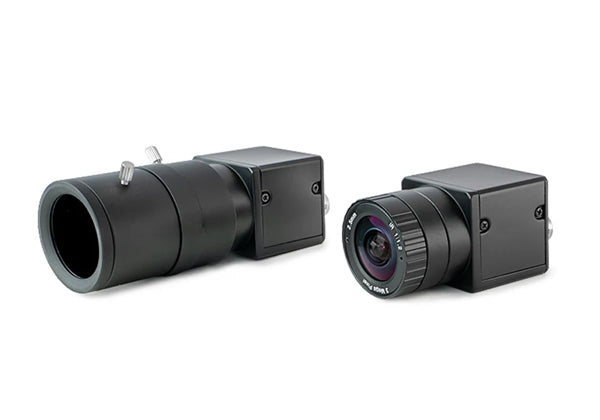
Swing Optix™ Cameras
Capture down-the-line and face-on swing videos at 1440 x 1080 resolution and 160 FPS. Frame-by-frame analysis, slow-motion playback, and drawing tools for detailed swing review.
- 2 high-speed motion capture cameras
- Interchangeable lenses (telephoto + fisheye)
- Swing-motion software license included

Performance Optix™ Bundle
Combines Swing Optix cameras with the Balance Optix mat — 1,100+ pressure sensors for real-time weight shift analysis. See exactly how your balance affects every shot.
- Everything in Swing Optix + Balance Optix mat
- Real-time weight transfer tracking
- Compare swings side-by-side in View software
19 Data Points. Portable. All Data Included.
In stock. Ships free within the contiguous 48 states. Financing available through Affirm.
Add to Cart - $2,999Learn More About Uneekor Launch Monitors
Explore our in-depth guides to choose and set up the right Uneekor for your simulator.
Best Simulator Software for Uneekor Launch Monitors
GSPro, E6 Connect, Creative Golf 3D, and more: which software works best with your Uneekor and what each one offers.
Uneekor vs Foresight: Which Brand Should You Choose?
Comparing the two leading photometric launch monitor brands on accuracy, software, price, and simulator experience.
Uneekor Launch Monitors Compared: MINI LITE to XO2
A side-by-side look at five Uneekor models (EYE MINI LITE, MINI, XR, XO, and XO2) to find your best fit.
Best Overhead Launch Monitors for Golf Simulators (2026)
Five overhead launch monitors from Uneekor, ProTee, and Foresight compared on price, data points, hitting zone, and best use.
How to Set Up a Uneekor Golf Simulator
Room size requirements, PC specs, mounting height, and step-by-step installation for every Uneekor launch monitor.
Uneekor EYE XO2 Review: Is the Flagship Worth It?
A close look at the XO2: 24 data points, three high-speed cameras, and how it compares to the XR and XO.
Uneekor EYE XR Review: Sticker-Free Overhead Tracking
Full review of the EYE XR: sticker-free ball tracking, 19 data points, and how it stacks up against the competition.
Uneekor EYE XO Review: 24 Data Points for $6,499
Everything you need to know about the EYE XO: accuracy, features, software compatibility, and value.
Uneekor EYE MINI & MINI LITE Review
Full breakdown of the EYE MINI and MINI LITE for home golf simulators: specs, accuracy, and best use cases.
How Launch Monitors Improve Your Golf Game
From ball speed to spin rates: how launch monitor data helps golfers of every level improve faster and practice smarter.
Overhead Golf Launch Monitors for Home Use
Why overhead-mounted launch monitors are ideal for home simulators and which models lead the category in 2026.
Do You Really Need a Golf Simulator Computer?
Why a purpose-built simulator PC beats an office laptop or budget PC: specs, software compatibility, and plug-and-play setup.
Your Purchase is in Good Hands
Contiguous 48 States
1-888-871-6110
From the moment you first contact us, we offer the very best advice and service to find the right product at the right price. We do not just sell boxes: we help you build the sim room you have been planning.
EYE MINI FAQs
Both track the same 19 data points with full club data, both read any ball with Dimple Optix, and both use club stickers for club metrics. The difference is what they need to run: the EYE MINI has a built-in battery, works indoors or out, and shows 11 of the 19 metrics on its own display with no PC attached. The EYE MINI LITE is stationary and indoor-only and requires a Windows PC. The EYE MINI is $2,999 and the EYE MINI LITE is $1,999.
Both are portable, camera-based launch monitors. The EYE MINI ($2,999) offers Club Optix slow-motion impact replay video: the GC3 does not. The GC3 ($6,999) has 3 cameras and uses club markers (included) for club data. Both work indoors and outdoors. If impact replay and budget matter, the EYE MINI wins. If you want Foresight's ecosystem, the GC3 is worth the premium.
Yes. The EYE MINI is fully compatible with GSPro, giving you access to 2,500+ courses. It also works with E6 Connect and TGC 2019. Third-party software requires the Uneekor Pro subscription ($199/yr). The free Player package includes Uneekor View Software with a virtual driving range.
Yes. The EYE MINI connects to an iPad over Wi-Fi through the VIEW Air app, and its on-unit display shows shot data with no device attached. Uneekor says a PC makes initial registration and setup easier but is not required. For PC play it connects by CAT6 ethernet. Uneekor's PC system requirements: Windows 11 Home or Pro, Intel Core i7 (12th Gen or later) or AMD Ryzen 7 (5000 Series or later), 32 GB RAM, NVIDIA RTX 4070 Ti or equivalent, and a dedicated ethernet port for the launch monitor. The EYE MINI can plug straight into your PC or connect through a router, network switch or wall jack.
The EYE MINI uses Dimple Optix technology: the same camera-based spin measurement found in Uneekor overhead models. It captures back spin and side spin on every shot without special balls. Spin accuracy is comparable to units costing significantly more. For the most accurate readings, ensure the unit is level and the ball is placed correctly within the 12" x 8" hitting zone.
Club stickers typically last multiple sessions before needing replacement. The longevity depends on how hard you strike the ball and how often you play. The EYE MINI comes with 1,280 stickers. Replacement stickers are available from Uneekor. The tweezers included in the box are for easy sticker removal and placement.
Yes. The EYE MINI is battery powered (6-8 hours per charge) and weighs just 8 lbs, making it ideal for outdoor range sessions. Place it on a flat surface beside the ball, connect to your PC via ethernet, and start hitting. Uneekor says the EYE MINI can be used indoors and outdoors.
Yes. The EYE MINI works with standard hitting mats, but Uneekor lists it as not compatible with Trouble Mats. For indoor simulator use, we recommend a quality golf hitting mat from our hitting mat collection. The unit sits on the floor beside the ball, not on the mat itself. Make sure the EYE MINI is level with the hitting surface for the most accurate readings.
Yes. Uneekor builds putting analysis into the EYE MINI to help you train distance control, start line and consistency. If putting practice is a priority, consider pairing it with a dedicated putting mat or green.
The EYE MINI ($2,999) is portable with battery power and includes Club Optix impact replay video. The Bushnell Launch Pro uses Foresight GC3 technology and requires a subscription for full features. The EYE MINI's free Player package includes all data with no paywall. If you want all data included and impact replay, choose the EYE MINI. If you want Foresight-level accuracy and do not mind a subscription, the Bushnell Launch Pro is a strong option.
We recommend a minimum of 12 feet wide x 9 feet high x 12 feet deep for a full indoor simulator setup. Space requirements vary depending on the enclosure and mat you choose. The EYE MINI itself sits on the floor beside the ball and takes up minimal space. For outdoor use, you just need a flat surface and enough room to swing.
Yes. We offer financing through Affirm. You can see monthly payment options at checkout. The EYE MINI also ships free within the contiguous 48 states.
All six: Net, Floating Screen, DIY Enclosure, Pro Enclosure, Curved Screen and Built-In Screen. The EYE MINI sits beside the ball instead of behind you, so it adds nothing on top of each format's own room depth: at least 16 ft 0 in for the Pro Enclosure and the Curved Screen; 16 ft 9 in, with 18 ft 9 in for a full driver swing for the Carl's DIY kit; and 14 ft, with 18 ft for a full driver swing for a floating-screen bay.
Only what the enclosure itself needs: at least 16 ft 0 in in the Pro Enclosure or the Curved Screen; 16 ft 9 in, with 18 ft 9 in for a full driver swing in the Carl's DIY enclosure; and 14 ft, with 18 ft for a full driver swing in a floating-screen bay. Carl's plans a Built-In room as 12 in behind the screen for buffer space plus 6 in to install the flaps, at least 10 ft from the screen and 7 ft of swing room in every direction. The EYE MINI sits beside the ball, level with the hitting surface, so it adds no depth behind you.
Yes, at a room depth of at least 16 ft 0 in. Carl's curved kits run 14 ft to 17 ft wide, which leaves room on either side of a centered tee for the EYE MINI beside the ball.
Warranty: Uneekor warrants for 12 months from delivery that all new or refurbished equipment and other hardware and accessories will be free from manufacturing defects in material and workmanship. Warranty exclusions apply. Original purchaser only.
Returns: Uneekor launch monitors and related base-level software are eligible for return earlier of 15 days after license activation or 60 days after receipt. Customer is responsible for return shipping costs.
For full details, see our Return Policy.
Questions? Call us at 1-888-871-6110 | Browse All Uneekor Products | All Launch Monitors
Uneekor EYE MINI: yearly cost and what runs it
| Yearly cost | Course play in Uneekor REFINE: Pro $199/yr. All plans $199 to $599/yr.3-year cost with that plan: $3,596.00 |
|---|---|
| What runs it | Uneekor VIEW on Windows PC, VIEW Air on iPad and the EYE MINI app on iPhone and Android. Works with GSPro, E6 Connect, Creative Golf and ProTee Play. No PC needed for its own app; Uneekor REFINE, GSPro and Creative Golf need a gaming PC. |
Uneekor EYE MINI simulator packages
| Package | Net | Floating Screen | DIY Enclosure | Pro Enclosure | Curved Screen | Built-In Screen |
|---|---|---|---|---|---|---|
| Package price from | $4,293.00 | $6,001.00 | $6,765.90 | $8,975.95 | $13,055.95 | $5,806.00 |
| Net, screen or enclosure | Net, 4.5' to 10' wide | Floating impact screen, 8', 10' or 12' wide | DIY enclosure, 8' to 13' wide | Pro enclosure, 10.5' to 15.5' wide | Curved enclosure, 14' to 17' wide | Built-In screen sewn to your wall, 8' to 20' wide |
| Min room (W x H x D) | The net's size, 16' deep | 10' W x 9' H x 16' D | 8' 10" W x 8' 7" H x 16' 9" D | 11' 7" W x 8' 9" H x 16' D | 14' 4" W x 9' 6" H x 16' D | 10' W x 9' H x 18' D |
| Hitting mat | Included | Included | Included | Included | Included | Included |
| Projector | Not included | Included | Included | Included | Included | Included |
| Software | Uneekor View: Player tier (free), with the EYE MINI in every package | |||||
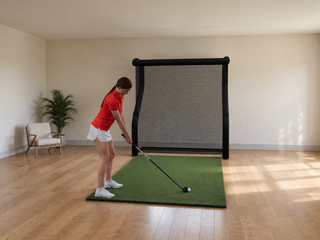
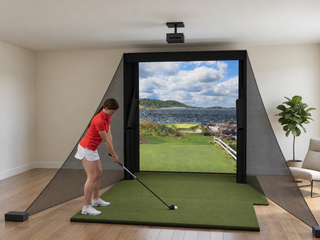
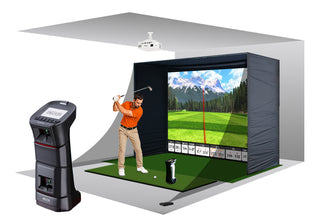
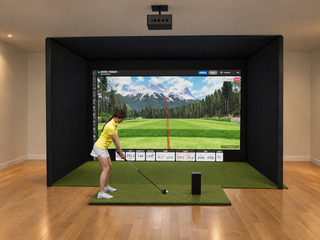
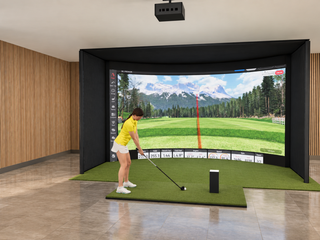
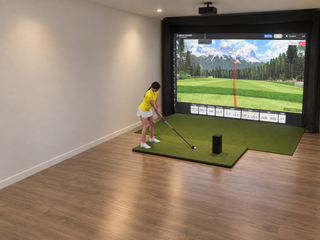
Recommended for the EYE MINI: the DIY Enclosure, our best seller, and the Floating Screen, which minimizes bounce-back for tighter rooms. Min room: the smallest size of each package, with the depth and ceiling the EYE MINI needs.
Uneekor EYE MINI head to head
